TL:DR
Most AI deployments in engineering stall at the pilot stage because they target individual tools rather than the workflows between them. This article documents three engineering organizations that have moved past proof of concept by deploying orchestrated AI agent systems on the Synera platform: a DACH-region Tier-1 automotive supplier that cut RFQ completion time from three days to minutes; Knorr-Bremse, which automated FEM simulation preparation to eliminate human error and free specialists for higher-value analysis work; and a premium appliance manufacturer that embedded real-time cost feedback directly into the NX design environment. In each case, the performance gain came not from a more capable AI model, but from removing the manual handoffs between tools that had been consuming engineering capacity.
Most engineering AI projects do not fail because the technology does not work. They fail because the technology works inside one tool while the actual productivity loss is sitting in the gaps between tools.
A simulation engineer still has to extract geometry, format it for the meshing tool, validate the mesh, and pass it to the solver. A cost estimator still has to wait for the design to be finished before the numbers can run. A quoting team still has to coordinate across four systems before a response can go out.
Gartner's 2025 evaluation of twenty AI use cases for design and engineering in manufacturing identified eight "Likely Wins" where technology maturity, ROI, and adoption feasibility align. What the framework does not capture is the step-change in value that occurs when those use cases are connected into orchestrated, multi-tool workflows rather than deployed in isolation.
This article shows what that step-change looks like in practice, across three engineering organizations that have reached production.
Why the tool is never the constraint
The engineering tool stack at most automotive, aerospace, and large manufacturing organizations has not shrunk, it has grown. CAD systems, FEM pre-processors, costing platforms, PLM environments, ERP systems, requirements databases: each serves a function, each holds a piece of the engineering picture, and each requires a specialist to operate it and a person to carry its output to the next tool in the chain.
This is the constraint that individual AI tools do not solve. A copilot inside a CAD system accelerates what happens inside that system. It does not eliminate the time an engineer spends extracting results, formatting them for the costing team, waiting for an estimate, then returning to the geometry to iterate. The handoffs remain. The coordination overhead remains.

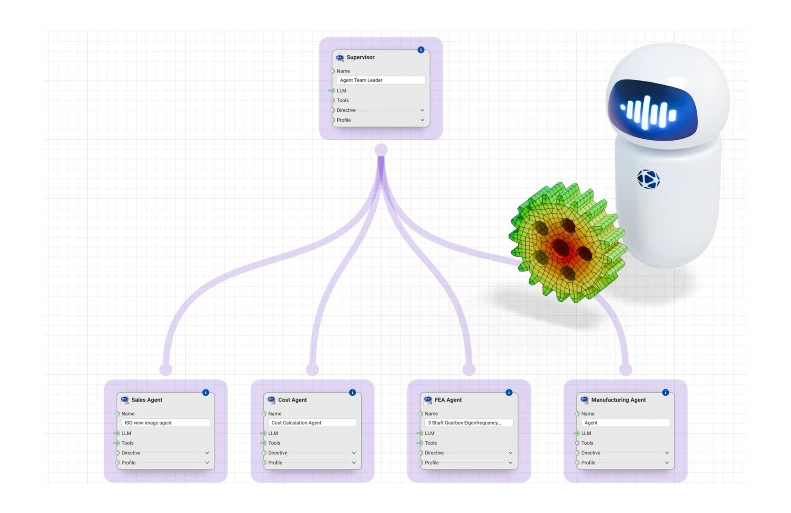
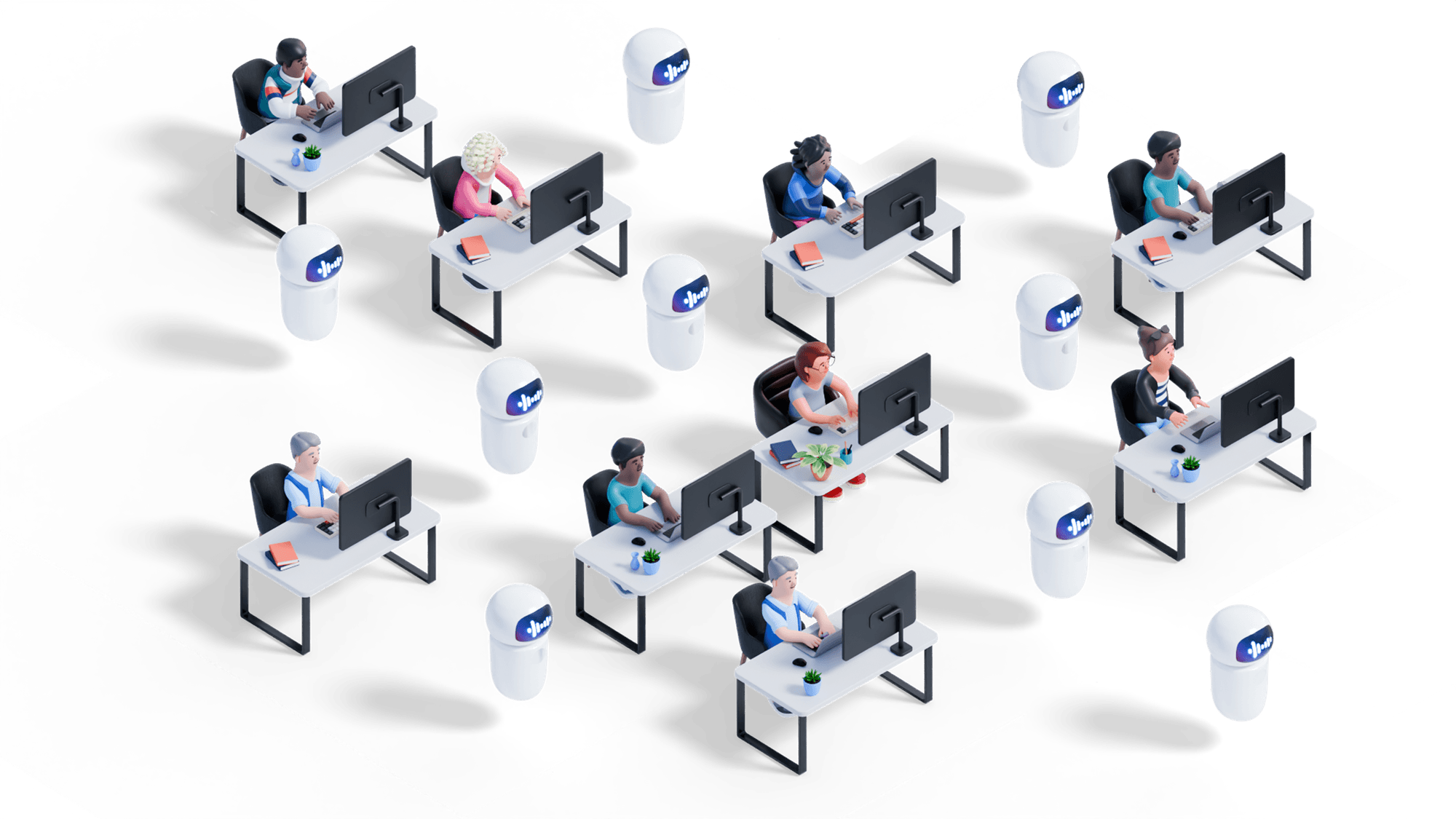
Process orchestration addresses a different problem. Instead of augmenting a single tool, an orchestrated team of AI agents coordinates across the full workflow, reading outputs from one system, passing them as inputs to the next, validating at each stage, and surfacing results through a single interface. The engineer’s role shifts from coordinator to reviewer: the agents handle the repetitive cross-tool execution; the engineer retains judgment over the results.
The three use cases below show what that shift looks like in practice.
USE CASE 01: RFQ Automation at a Tier-1 Automotive Parts Supplier
Gartner framework: Predictive Costing + Parts Search for Design
Note: This customer is a DACH-region Tier-1 automotive supplier. Their name is withheld due to contractual confidentiality restrictions.

A tier-1 automotive parts supplier operating across Germany and the DACH region was facing two converging pressures: shorter development cycles from OEM customers and tighter margins on every quotation. Their Request-for-Quote (RFQ) process was a manual, multi-day workflow that required engineers to work across four separate systems.
Before orchestration
When an RFQ arrived, an engineer would
- Manually search historical projects for comparable parts
- Extract relevant specifications from documents
- Estimate manufacturing costs using Excel-based templates
- Cross-reference material costs from the ERP system, and compile the final quotation.
The full process spread across the CAD library, document repository, Excel estimation templates, and ERP took three days per RFQ and involved several engineers coordinating the handoffs between systems.
At the volume of RFQs typical for a tier-1 supplier, that time commitment represented a significant constraint on capacity. Slower responses meant lost opportunities, particularly as customer timelines compressed.
How orchestration changed the workflow
The supplier deployed a team of AI agents on the Synera platform, each responsible for a distinct function within the RFQ process:
- A requirements agent extracts specifications from incoming RFQ documents, parsing customer requirements and flagging ambiguities for engineer review.
- A geometry agent searches the CAD library for similar parts, identifying comparable historical components based on geometric similarity.
- A process agent determines the appropriate manufacturing approaches based on the identified geometry and customer specifications.
- A costing agent calculates the selling price using historical project data and current material costs from the ERP system.
The critical design decision was not which agents to deploy but how to connect them. Rather than four separate AI tools each requiring a manual handoff, the team implemented
- A coordinator agent that manages the full workflow: passing context between specialized agents, maintaining state across the process, and handling exceptions when input data is incomplete.
- A system where engineers interact with a single interface while all cross-tool complexity is handled by the agent system hosted on Synera.
The outcome
An RFQ process that previously took three days now completes in minutes. The supplier’s engineering team now handles a substantially higher volume of RFQs without adding headcount and responds faster to OEM timelines.
The workflow maps directly to two of Gartner’s Likely Win use cases (Predictive Costing and Parts Search for Design) and the time saving comes specifically from combining them into an orchestrated process rather than deploying either in isolation.
USE CASE 02: Simulation preparation at Knorr Bremse
Gartner framework: Simulation Model Creation and Governance
Knorr-Bremse, a leading manufacturer of braking systems for commercial vehicles, needed to run finite element method (FEM) and FEMFAT fatigue analysis on crankshaft models as part of their engineering validation process. The preparation work required to get a model ready for simulation (defeaturing, surface detection, and meshing) was manual, specialist-dependent, and a consistent source of variability in output quality.
Before orchestration
Simulation preparation at Knorr-Bremse was fragmented across multiple tools:
- Geometry preparation in one application
- Meshing in another
- Simulation setup in a third
Each step required a specialist to work manually, validate the output, and pass it on. This created risk: errors at any transition could propagate into results and force the entire sequence to restart.
But the bigger problem was consistency of results over time. When quality depends on individual judgment at every step, output varies. For a manufacturer where engineering validation underpins product quality, that variability had direct implications for the reliability of results.
Before and After: Simulation Preparation
How orchestration changed the workflow
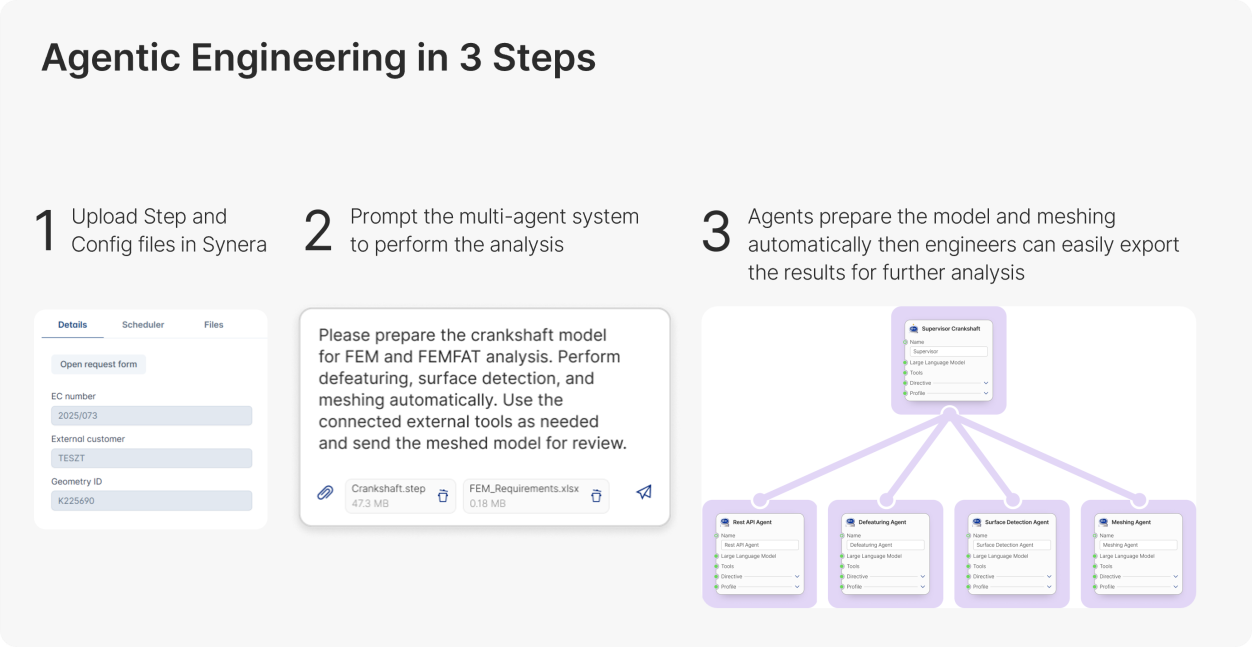
Knorr-Bremse implemented an orchestrated simulation preparation workflow with Synera, structured in three steps that any engineer on the team can initiate:
- The engineer uploads the STEP file and configuration parameters into Synera.
- The Synera agentic AI system, a supervisor coordinating a defeaturing agent, a surface detection agent, and a meshing agent, processes the model autonomously, passing validated outputs between agents at each stage and flagging exceptions for engineer review.
- The engineer reviews the prepared model and exports the results for the simulation run.
Each agent in the workflow handles its specific task according to defined engineering rules, ensuring that the physics-critical decisions remain deterministic and auditable. The supervisor agent coordinates sequencing, manages data flow between tools, and ensures that each step completes correctly before the next begins.
“Synera integrates our software ecosystem into a unified, AI-ready platform where engineers can automate a wide range of tasks to spend more time on moving the business forward.”
— Dr. Zoltán Gyurkó, Team Leader, Knorr-Bremse
The outcome
By automating repetitive preparation steps and removing manual handoffs, Knorr-Bremse eliminated a key source of human error from their simulation workflow.
The impact:
- Higher consistency in simulation inputs
- Fewer errors propagating into results
- More specialist capacity, engineers now focus on analysis and interpretation, not preparation
The workflow was built and validated on the Synera platform by Simulation Engineer Bálint Farkas, Software Development Engineer Zsombor Csuvár, and Dr. Gyurkó's team.
USE CASE 03: Design-to-cost integration at a premium appliance manufacturer
Gartner framework: Predictive Costing + Design Concept Generation
A premium appliance manufacturer sought to integrate cost awareness into the design process itself, rather than treating cost estimation as a downstream activity that followed design completion. The problem was not a lack of costing capability as the team used FACTON for cost estimation, but the sequential structure of the process that kept cost visibility away from the engineers making design decisions.

Before orchestration
The existing workflow ran in disconnected stages:
- Engineers completed designs in NX
- Exported files and submitted them to a costing team using FACTON
- Waited for estimates to return
- Iterated on the design based on feedback
Each handoff added latency, making rapid iteration impractical.
The deeper problem was timing. Cost feedback arrived too late, after design decisions had already been made and were expensive to reverse. The process effectively rewarded completing a design before testing its economics, the opposite of what design-to-cost methodology requires.
How orchestration changed the workflow
The manufacturer deployed a coordinated team of specialized agents for design, costing, and simulation on the Synera platform, running continuously rather than sequentially.
How it works:
- An engineer modifies a design parameter in NX
- The costing agent instantly recalculates cost implications using FACTON
- If thresholds are exceeded, the design agent surfaces alternatives
- Engineers see cost impact in real time, within the design environment itself
Spring designs for plastic panels, for example, are now generated with cost visibility built in. Not because any individual AI became more capable, but because agents working across NX and FACTON in concert surface information that previously only appeared at the end of the process.
The outcome
Cost awareness is now embedded in the design phase, which is where it has the most influence on outcome. Design decisions that would previously have been flagged as too expensive at the end of development, when changing them is costly in both time and rework, are now identified and addressed during design, when alternatives are still practical.
The shift reflects what Gartner identifies as one of the core value propositions of AI in engineering: enabling designers to see the cost implications of their choices before manufacturing specialists commit resources. The orchestration layer that makes real-time, cross-tool cost visibility possible is what transforms that value proposition from a concept into a working engineering environment.
The pattern these use cases share
Three industries. Three workflows. Three different Gartner use cases. The same implementation pattern each time.
Table: Synera AI Agent Orchestration: Production Use Case Comparison
The starting point was workflow mapping instead of technology:
- Where is time being lost?
- Where are the manual handoffs?
- Which steps are high-volume, repeatable, and bottlenecked by specialist availability?
AI and tool selection followed from those answers, not the other way around.
The architecture was consistent across all three:
- Specialized agents handling discrete tasks
- A coordinator managing context and sequencing
- Engineers retaining judgment at the points where it matters
The outcome wasn't marginal efficiency gains — it was a structural change to how work gets done, one that compounds as more processes connect.
For engineering leaders, the implication is straightforward: the value of a single Gartner Likely Win is real but bounded. Connecting two or three into an orchestrated workflow delivers categorically more value, because the constraint isn't capability inside one tool, it's coordination across all the tools engineering work spans.
Identifying Where Orchestration Creates the Most Value in Your Organization
The use cases above each started with the same diagnostic question: where in the engineering process does time disappear into coordination rather than engineering? The answer in each case pointed to a workflow that crossed tool boundaries and required manual handoffs to function. That is consistently where orchestrated AI agents return the most capacity to engineering teams.
If you are mapping your own organization’s AI investment priorities, two resources are worth using together. Gartner’s use case framework identifies which capabilities are ready to deploy and which carry higher implementation risk.

FAQs
What is AI agent orchestration in engineering?
AI agent orchestration is the coordination of multiple specialized AI agents across different tools within a single automated workflow. Each agent handles a discrete task such as geometry search, cost estimation, mesh generation, requirements parsing, and passes its output directly to the next agent, without manual handoffs. The result is an end-to-end automated process that spans the full engineering tool stack rather than operating inside one application.
How long does it take to deploy AI agents in an engineering workflow?
Simpler workflows targeting structured data such as predictive costing, parts search, requirements management, can reach production in four to eight weeks on the Synera platform. More complex workflows involving simulation preparation or multi-objective optimization typically take one to two quarters, depending on data maturity and integration requirements. The fastest deployments start with one well-defined workflow rather than attempting to orchestrate an entire process at once.
Which engineering workflows are best suited for AI orchestration?
The strongest candidates are high-volume, repeatable processes that currently require manual handoffs between two or more tools. RFQ generation, simulation model preparation, design-to-cost analysis, and PMI generation all fit this profile. Workflows that are low-volume, highly non-standard, or involve safety-critical decisions with no tolerance for error require additional validation infrastructure before orchestration is practical.
What is the difference between an AI copilot and an AI agent in engineering?
A copilot assists an engineer inside a single application; the engineer still coordinates handoffs to the next tool manually. An AI agent can act across systems, passing outputs from one tool directly to the next without engineer intervention. The distinction matters because in most engineering workflows, the productivity loss is in the coordination between tools, not inside any individual one. Copilots accelerate steps; agents eliminate the gaps between them.
How do AI agents connect to existing tools like NX, FACTON, or SAP?
Synera connects to engineering tools through native API integrations, file-based connectors, and purpose-built adapters across more than 80 CAD, CAE, PLM, ERP, and costing platforms, including Siemens NX, CATIA, Ansys, FACTON, and SAP. Engineers keep working in their existing applications; Synera's agent layer handles data movement and process coordination between them. Deployment can be on-premises, keeping engineering data and intellectual property within the organization's own infrastructure.
About the author:

Ram Seetharaman is Head of AI at Synera, leading the company's multi‑agent and agentic AI initiatives that are redefining how engineering teams design, simulate, and automate complex products. With a background in Computational Mechanics from the University of Stuttgart and five years applying ML and AI to engineering workflows, he bridges deep technical R&D and product strategy. At Synera, he owns AI strategy, roadmap, and implementation, translating domain expertise into AI‑driven workflows that accelerate simulation, design-space exploration, and automation at scale.
Before Synera, Ram contributed to award‑winning motorsport and aerospace projects as a Digital Twin and structural optimization engineer, became a World Champion in 2023, and worked at Volocopter on safety‑critical battery crash simulations.